
Why Visual Supports Help Special Education Learners
Discover why visual supports help special education learners thrive. Explore evidence and benefits that make learning more effective.

Why Visual Supports Help Special Education Learners
TL;DR:
- Visual supports provide students with stable, visual cues that remain accessible, unlike fleeting verbal instructions. They enhance understanding, reduce frustration, and foster independence, especially in learners with special needs. Effective implementation involves explicit teaching, individual adaptation, and consistent scaffolding to maximize their benefits.
When verbal instructions disappear the moment they’re spoken, many learners in special education are left guessing. Understanding why visual supports help special education students starts with recognizing that spoken words are fleeting, but a picture on the wall stays put. Visual supports, the formal term used across occupational therapy, speech-language pathology, and special education is “augmentative and alternative communication strategies” or simply “aided communication methods,” give students a stable anchor when processing verbal information alone is unreliable. This article breaks down the evidence, the practical mechanics, and the deeper benefits you may not have considered yet.
Table of Contents
- Why visual supports help special education students learn
- Visual supports for emotional regulation and behavior
- Implementing visual supports that actually work
- Advanced benefits: independence and executive functioning
- My honest take on why visuals get misused
- Build better routines with Growingbalanced
- FAQ
Why visual supports help special education students learn
At its core, the power of visual supports in learning comes down to persistence. A spoken direction vanishes in seconds. A visual cue stays right where the student can find it. That difference is significant for learners with autism, ADHD, language-processing differences, or intellectual disabilities who need to revisit information multiple times before it registers.
Visuals make expectations understandable, increasing student engagement across classroom, home, and community settings. Think about what that looks like in practice: a photo sequence showing the five steps to washing hands, a color-coded daily schedule on the board, or a labeled cubby with a picture of the child’s name alongside the text. Each of these tools converts abstract expectations into concrete, accessible information.
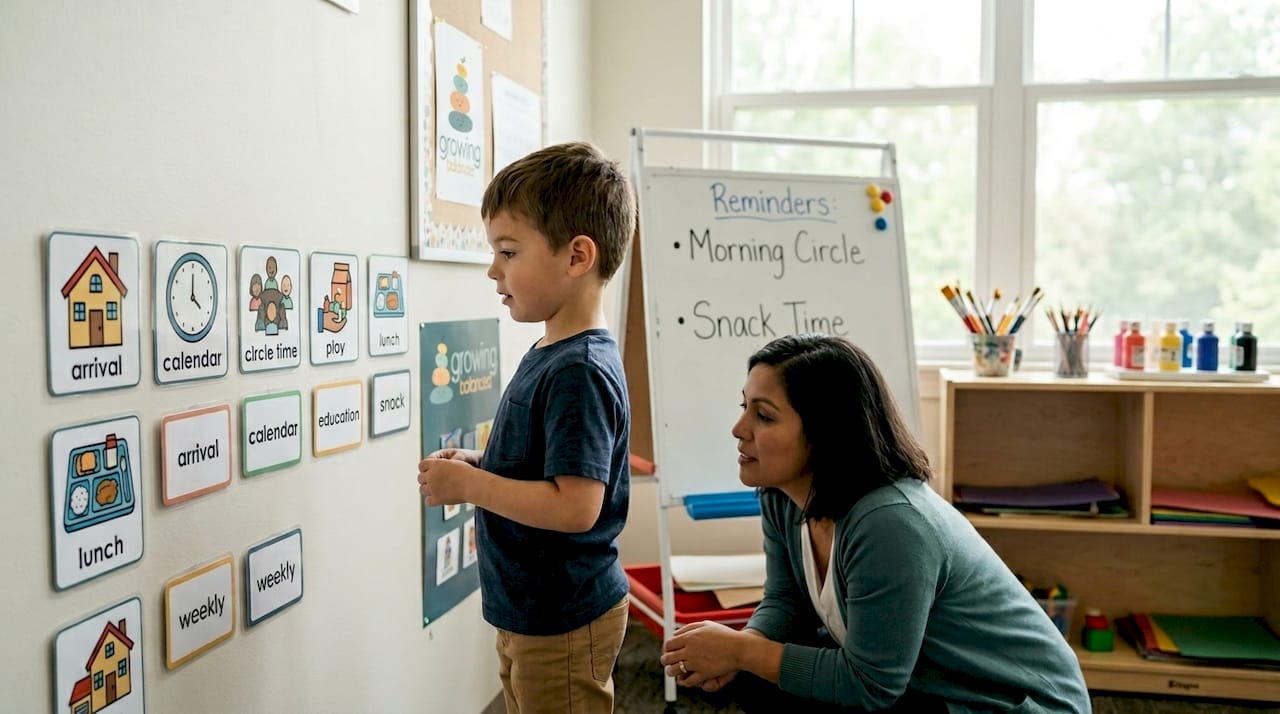
The benefits of visual aids go beyond simple reminders. Research shows that supplementing oral communication with visuals reduces frustration, decreases anxiety, and increases a student’s ability to complete tasks independently. Teachers report fewer repeated verbal cues when visuals are used consistently. That reduction in re-prompting matters because every time an adult has to repeat an instruction, the student gets a subtle message that they need rescuing, which chips away at confidence over time.
Here are some of the most effective visual formats used in special education today:
- Visual schedules: Strip away uncertainty about what comes next during the school day
- Task analysis charts: Break multi-step directions (like getting ready for lunch) into numbered pictures
- Labeled environments: Pictures and words on shelves, bins, and doors reduce search anxiety
- Pictorial instructions: Step-by-step visuals for academic tasks or self-care routines
Pro Tip: Place visual schedules at the student’s eye level, not the adult’s. A schedule mounted at 5 feet does nothing for a seven-year-old.
Visual supports for emotional regulation and behavior
Knowing that you’re angry is not the same as knowing what to do about it. This is exactly where visual tools for special needs students make a difference that verbal coaching alone cannot match. Effective emotion regulation visuals teach sequences students can follow when they’re already under stress, rather than simply labeling feelings after the fact.
Visuals help children recognize and communicate emotions, support problem-solving, and encourage social interactions with peers. A well-designed emotion chart doesn’t just show a row of faces with labels. It shows: “I feel frustrated” pointing to “I can take three deep breaths” pointing to “I can ask for help.” That sequence becomes a script students can follow when their verbal processing is compromised by high emotion.
Social stories are another powerful example. These short, illustrated narratives walk students through expected behaviors in specific social situations, like taking turns during a game or greeting a new classmate. For students who struggle to read social cues, seeing a situation played out in images reduces the guesswork that so often leads to anxiety or behavioral escalation.
- Emotion cards: Portable visuals that let nonverbal or minimally verbal students point to how they feel
- Behavior anchor charts: Co-created visuals showing classroom expectations in concrete, positive language
- Coping strategy menus: Visual lists of calming options students can choose from independently
- Social stories: Picture-based narratives that prepare students for new or challenging situations
For teens and older students, parents can explore resources on learning emotional regulation to find visual tools that scale appropriately to age and context.
Pro Tip: Laminate emotion cards and attach them to a student’s desk with a ring clip. When a student is dysregulated, handing them a physical object is faster and less escalating than asking them to look at the wall.
Implementing visual supports that actually work
Posting a visual schedule is the beginning, not the finish line. The importance of visual strategies lies in how they are taught, not just how they are displayed. Students need to be explicitly taught to use each visual support, with scaffolding that fades over time as they internalize the routine.
Here is a practical sequence for introducing a new visual support:
- Introduce the visual directly. Show the student what it is, where it lives, and what it means. Don’t assume it’s self-explanatory.
- Model its use. Walk through the visual with the student during a calm moment, not mid-transition.
- Prompt with the visual during real situations. Point to it rather than repeating verbal instructions. Let the object do the talking.
- Fade prompting gradually. Shift from physical pointing to gestural cues to waiting for independent referencing.
- Check comprehension regularly. Ask the student to show you what they will do next by using the visual, not by answering verbally.
Teaching and scaffolding visual use until students internalize the information is what separates effective programs from decorative ones.
| Common pitfall | Better approach |
|---|---|
| Visuals only visible to the teacher | Place them where students can reach and reference them independently |
| Overly complex or cluttered designs | Use simple images, minimal text, high contrast |
| Visuals used in one setting only | Replicate or adapt them across home, school, and therapy |
| Removing visuals too quickly | Keep them available until independence is consistent |
| One-size-fits-all approach | Adapt format, complexity, and content to each student’s needs |
Adapting visuals to the individual matters more than most people realize. A high school student with autism needs a different format than a five-year-old with Down syndrome. Age-appropriate images, relevant content, and the right level of text complexity are all part of getting this right.
Advanced benefits: independence and executive functioning
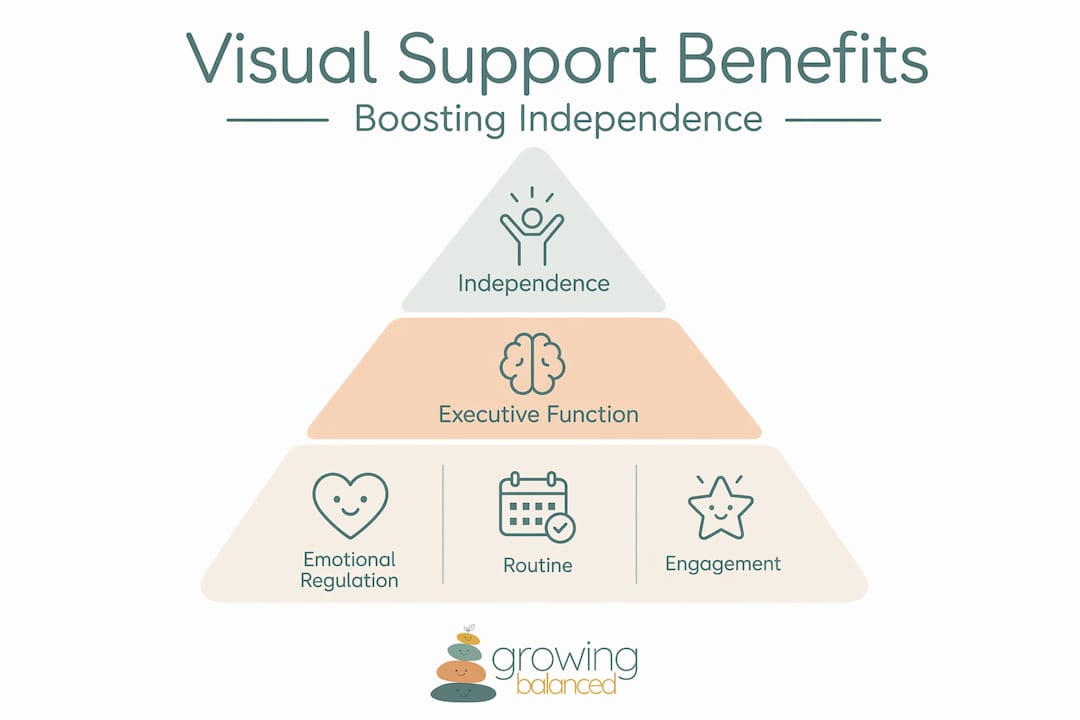
The most underappreciated benefit of how visuals aid learning is what they do for a student’s independence. Every time a student checks their visual schedule instead of asking an adult “what do we do next,” they practice self-management. Over time, that habit becomes internalized regulation.
Visuals serve as ongoing cues that reduce adult prompting and support independent participation, especially during transitions when uncertainty is highest. Transitions are notoriously difficult for students with sensory processing challenges or executive-function deficits because they require shifting attention, switching tasks, and managing the unknown. A clear visual sequence for transitions directly targets that vulnerability.
Visual timers deserve specific mention. Visual timers help students conceptualize how much time remains in an activity, which reduces anxiety and motivates task completion without requiring constant adult commentary on the clock. Abstract time becomes concrete, colored, disappearing space.
| Benefit area | How visual supports contribute |
|---|---|
| Executive functioning | Visual schedules and timers externalize planning and sequencing |
| Emotional regulation | Emotion sequences provide scripts for self-regulation under stress |
| Independence | Students reference visuals autonomously rather than relying on adults |
| Sensory regulation | Sensory-based tools integrated with visuals improve attention and reduce dysregulation |
You can also explore adaptive tools for special education to understand how visual strategies fit within a broader support system alongside sensory and motor tools.
My honest take on why visuals get misused
I’ve seen classrooms wallpapered with visual supports that students never once look at. The adults made them, the adults know what they mean, and the students have never been taught to use them. That’s not a visual support program. That’s decoration.
What I’ve learned from working across OT, education, and family settings is that visuals work when they are treated as teaching tools, not display items. The moment you shift from “I have this posted” to “I taught my student to use this,” your outcomes change dramatically.
I’ve also noticed that adults underestimate how much students across different diagnoses benefit from the same core visuals. A child with sensory processing differences, a student with anxiety, and a kid with ADHD all benefit from a clear, predictable schedule. The visual doesn’t care about the diagnosis. It just makes the world more legible.
The misunderstanding I push back on most often is the idea that visual supports are a crutch. A student who references a schedule to complete their morning routine is not dependent. They are organized. Most adults I know use a calendar, a to-do list, and a phone alarm. We call that competence.
— Kelsey
Build better routines with Growingbalanced
If you’re looking to put these strategies into practice, Growingbalanced offers OT-informed daily visual schedules designed for both home and classroom use. The platform makes it easy for parents, teachers, and therapists to create personalized routines that reduce anxiety and build independence for learners with diverse needs.
Growingbalanced also provides resources on visual behavior charts and sensory support strategies, giving you a practical library to draw from whether you’re supporting one child or an entire classroom.
FAQ
What are visual supports in special education?
Visual supports are pictures, symbols, written words, or objects used to make information accessible to learners who have difficulty processing verbal instructions alone. They include schedules, emotion cards, social stories, and task analysis charts.
Why do visual supports reduce anxiety in students?
Visual information’s persistence lets students return to the information repeatedly, which reduces the uncertainty and frustration that come from trying to remember spoken directions. Predictability reduces stress.
How do I know if a visual support is working?
The clearest sign is reduced adult prompting. If a student begins referencing the visual independently and completing tasks with less redirection, the support is doing its job.
Can visual supports help with emotional regulation?
Yes. Visuals that teach a step-by-step sequence for managing emotions give students a concrete script to follow when they are overwhelmed, which is far more useful than verbal coaching in the moment.
Do visual supports work for older students?
Absolutely. The format changes, but the function stays the same. Older students benefit from supports for independent participation like timers, written checklists, and graphic organizers that support planning and task completion.